Follow an order.
Stay with the coffee.
A sack becomes a roast. A recipe becomes instructions. An order becomes a clear task for the next person.
Start with the
coffee you have.
The order needs 20 kg of a 60:40 espresso blend. Before anyone roasts, the team needs to know which green coffee has arrived, what it weighs and where it is.
Buy, receive, move.
- Plan the purchase. Record the supplier, coffees, quantities and destination on a green purchase order.
- Receive each sack. Give it a code, actual weight, location and rack. Print its QR label for the physical handoff.
- Record the journey. Send coffee from warehouse to roastery, then record its arrival weight and condition. Only received roastery stock can be roasted.
A sack is a record.
- Sack code
- GRN-0048
- Coffee
- Espresso Base Arabica
- Received weight
- 30.0 kg
- Location
- Roastery
- Rack
- R-02
Illustrative record · Demo roastery. Each actual sack keeps its own movement history.

The order stays
with the work.
Sales records the coffee, roast, grind, pack size and quantity. That Ops order becomes production demand, a packing task and an order ready for dispatch.
- Pending
- Roasting
- Packaging
- Ready to ship
- Shipped
- Delivered
Record what went in.
Know what came out.
Log the green coffee used and the roasted weight produced. Yield and weight loss become part of the batch record, alongside the roasted stock available for packing.
In this example, 24 kg of green coffee becomes 20.4 kg roasted: an 85% yield. The two coffees are roasted as separate batches, then follow the blend recipe at packing.
Cropster can remain your profiling tool. Its synced records sit alongside the physical stock and roast work recorded in Ops.
See the Cropster connection24.00Green in (kg)
20.40Roasted out (kg)
15.0%Weight loss
Percentages become
grams per bag.
The 60:40 recipe becomes 600 g of Arabica and 400 g of Robusta in each 1 kg bag. For 20 bags, the team needs 20 kg of roasted coffee.
Choose a smaller pack size in the example to see the instructions change. In Ops, the pack size and quantity come from the order; the recipe reaches the person doing the packing.
Packing records the completed quantity and the coffee consumed. When every order line is packed, the order is ready to dispatch.
Dark Horse Espresso
Demo roastery · 20 bags- Espresso Base Arabica 60%
- 600 g per bag
- Espresso Base Robusta 40%
- 400 g per bag
- For the whole order
- 20 kg 20 × 1000 g
The recipe becomes whole-gram instructions. This example stays on this page; it does not create an order.
At the table.
Beside the coffee.
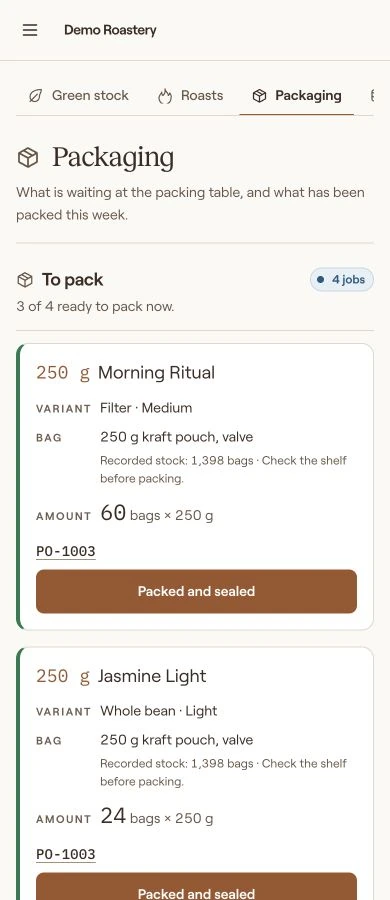
Floor teams can use the workspace on a phone. The packing task shows the product and variant, bag, number of packs, and whether the work is ready to begin.
Completed jobs remain attached to their orders, with packing records available for a closer look at stock consumed.
These are production records, not a complete reservation ledger for finished goods.
Ready to leave is a clear handoff.
All lines packed → ready to ship. Your team arranges the shipment, marks it dispatched, and records delivery when appropriate.
The invoice keeps its reference.
Map the customer and send the supported invoice to Zoho Books. Review prices and taxes there before issuing it. Payment collection stays in Zoho; courier booking is not yet part of Ops.
See how Zoho Books connectsStep back.
See the whole flow.
Today shows the work that needs attention now. Analytics lets Owner and Accounting review orders, roasted output and packed quantities over a chosen period.
Compare the previous period, narrow the report by customer, coffee or location, open the records, or download a CSV for a closer look.

Stock is a current snapshot. Synced Shopify totals are shown separately by currency. These reports do not calculate profit.
The right view.
For the job at hand.
Choose a role to see its responsibilities. Floor roles see the work they need, with customer details masked unless an authorized reveal is made in the actual app.
Staff sees
- Sales orders
- Customers
- Green stock
- Roasting
- Packaging
- Master data
Less chasing updates.
More time for coffee.
Bring your own workflow to the conversation. We can walk through where Daily Brew Ops fits.